> For the complete documentation index, see [llms.txt](https://docs.oku.trade/home/llms.txt). Markdown versions of documentation pages are available by appending `.md` to page URLs; this page is available as [Markdown](https://docs.oku.trade/home/extra-information/closing-legacy-positions.md).
# Closing Legacy Positions
In the event that we no longer support a chain where you previously deployed liquidity, we've created a tool to close your position after deprecation
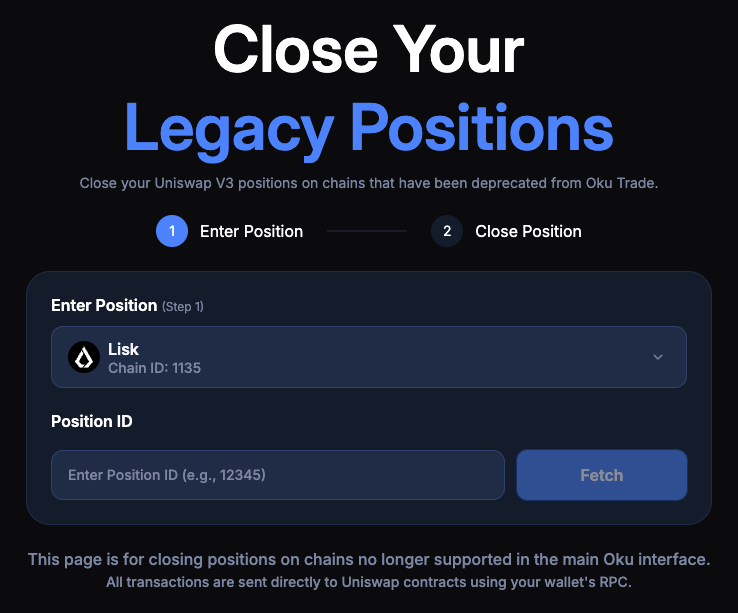
1. Access the tool here:
2. Select the network where you intend to close your position.
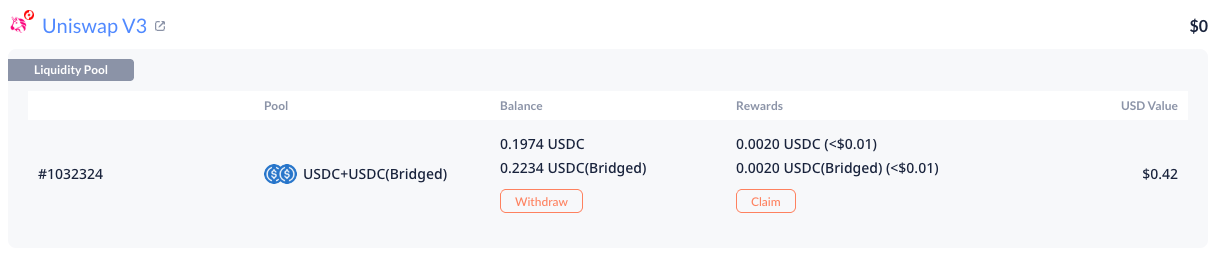
3. Enter your position ID and click Fetch. To retrieve your position ID, enter your wallet address on and search for Uniswap V3 liquidity positions or enter your wallet address directly on the network explorer and search for the Mint action.
DeBank view of an active liquidity position with corresponding Position ID
4. Press Close Position - your funds will be returned to your wallet.